
8 Genius School Binder Organization Ideas That Actually Work in 2026
The school binder. Is it a tool for success or a black hole where assignments and good intentions disappear? For countless K-12 students, the daily struggle to keep track of papers, notes, and deadlines is a major source of stress and academic friction. A disorganized binder isn't just messy; it's a direct obstacle to learning, focus, and confidence. It’s the physical manifestation of overwhelm, and it doesn't have to be this way.
By implementing intentional, brain-friendly systems, a binder can become a powerful command center that supports executive function, reduces anxiety, and paves the way for academic achievement. These aren't just generic tips; they are strategic school binder organization ideas designed to meet diverse student needs, from elementary schoolers learning the basics to high schoolers managing AP workloads. This roundup provides eight distinct, actionable systems you can implement today.
We’ll explore everything from foundational color-coding to advanced hybrid digital-physical models, with a special focus on strategies that support students with executive function challenges and other learning differences. For a holistic approach to preparing for the academic year, explore this guide on Stress-Free Back to School Organization. Let's move beyond the 'why' organization is important and get straight to the 'now what'—the practical steps to build a binder that works for your student.
1. The Foundational Fix: Master Subject-Based Color-Coding
Of all the school binder organization ideas, subject-based color-coding is the most powerful starting point. This method assigns a specific, consistent color to each academic subject, creating a visual shorthand that makes finding materials almost instantaneous. It’s a simple concept with a profound impact on a student’s daily routine and cognitive load.
Imagine a student’s binder where every material for Math is blue: the section divider, the corresponding spiral notebook, and the take-home folder. English is red, Science is green, and History is yellow. When it’s time to pack up for the day or find homework, the brain doesn’t have to read labels; it just has to spot the right color. This visual system is incredibly effective for students of all ages, but it’s a game-changer for those with executive function challenges or ADHD who benefit from clear, external cues.
Color-coding isn't just for looks; it's a neurological shortcut that reduces cognitive load and makes retrieval nearly automatic.
At Bright Heart Learning, our executive function coaches often begin with this strategy. We’ve seen it dramatically reduce morning stress and homework anxiety for families. By empowering students to quickly find what they need, the system builds confidence and reinforces the essential organizational skills for students that are crucial for academic success.
How to Implement Subject-Based Color-Coding
Making this system stick requires more than just buying colorful supplies. Follow these steps for lasting success:
Involve Your Child: The most critical step is to let your student choose their own color scheme. This creates a sense of ownership and makes them more likely to maintain the system.
Go All-In: Apply the chosen colors consistently across all school materials. If Math is blue, the binder tab, folder, and notebook should all be blue. This consistency is key.
Add Durability: Use sheet protectors for important papers like the color key itself, and consider laminating binder tab labels or folder tags so they withstand the wear and tear of a school year.
Adapt for All Learners: For students who are colorblind, pair each color with a distinct, bold symbol (e.g., a star for Math, a circle for English) or a large number.
Refresh Annually: Make choosing new colors part of the back-to-school ritual. This keeps the system feeling fresh and re-engages students in the organizational process each year.
2. Chronological Assignment Tracker with Due Dates
While subject-based organization is crucial, students also need a system to manage the flow of work over time. A chronological assignment tracker, organized by due date rather than subject, acts as a master calendar for all academic responsibilities. This method helps students visualize their workload, prioritize tasks, and develop essential time management skills.
Instead of flipping through different subject sections to figure out what’s due next, a student with this system has a single, central source of truth. A high schooler can see their AP Biology lab report, AP English essay, and Pre-Calculus test all on one calendar grid, understanding how deadlines interact. A middle schooler might use a simpler weekly checklist, noting daily assignments for each class. This approach is particularly effective for students developing executive functions, as it makes the abstract concept of time concrete and manageable.
An assignment tracker shifts the focus from "what subject is this for?" to "when is this due?"—a critical perspective for effective time management.
This is a core strategy used by academic coaches, inspired by productivity systems like David Allen's 'Getting Things Done'. By externalizing deadlines onto a physical tracker, students free up mental energy that would otherwise be spent trying to remember everything. This reduces the anxiety of the unknown and prevents last-minute panics over forgotten assignments.
How to Implement a Chronological Assignment Tracker
Creating a tracker that your student will actually use involves a bit of setup and routine. Follow these steps to build a lasting habit:
Establish a Daily Check-In: Dedicate a consistent 5-minute window each day, either after school or before bed, to update the tracker. This routine is the most important part of making the system work.
Choose a Consistent Format: Work with your student to select a format they like. Options include a calendar grid, a simple bulleted list for the week, or a hybrid model. The key is consistency.
Build in a Friday Review: Use a few minutes every Friday to look ahead at the coming week. This helps anticipate larger projects or busy periods and plan accordingly.
Break Down Big Projects: Teach your student to enter large assignments not just by their final due date, but also with smaller milestone deadlines (e.g., "Outline due," "First draft due").
Include Buffer Time: Encourage adding "personal" due dates that are a day or two before the actual deadline. This creates a buffer for unexpected issues and reduces stress. For more ideas on managing tasks, a detailed homework checklist can provide an excellent foundation.
3. Subject-Specific Section Dividers with Content Organization
Once students have master colors, the next layer of excellent school binder organization ideas is to create a hierarchy within each subject section. This advanced method involves using labeled sub-dividers to categorize different types of content, such as notes, homework, quizzes, and reference sheets. It’s a system that prevents the common chaos of a single, overflowing subject section where important papers get lost in a sea of handouts.
This granular approach helps students distinguish between different types of learning materials, which is a key skill for effective studying. For example, a high school biology student might organize a unit with separate tabs for lecture notes, lab reports, diagrams, and vocabulary lists. This makes it simple to pull out just the lab reports to study for a practical exam or review all vocabulary before a test, without having to sift through a jumbled stack of papers.
A well-organized binder section isn't just a place to store papers; it's a tool that models how to categorize and prioritize information for effective learning.
For students engaged in specialized coursework or tutoring, this system is particularly beneficial. An AP exam prep student can create sections for official practice tests, concept reviews, and progress trackers. A student working with a Bright Heart Learning tutor can maintain a designated spot for tutor-provided materials and targeted homework practice, keeping those high-value resources separate and accessible. This structure directly supports the development of crucial study habits.
How to Implement Sub-Section Dividers
Putting this hierarchical system into place requires some planning, but the payoff in clarity and efficiency is immense.
Establish Universal Categories: Create a consistent set of sub-categories to use across all subjects. Common and effective categories include: Notes, Homework, Quizzes/Tests, and Reference.
Label Everything Clearly: Use a label maker or print labels with a clear, consistent font for all sub-divider tabs. Handwritten labels work, but printed ones often hold up better and are easier to read.
Use Pockets for Key Resources: Add transparent pocket dividers or sheet protectors for frequently used items like formula sheets, periodic tables, or a syllabus. This keeps them visible and protected.
Create a "Review" Section: Include a dedicated sub-section in each subject for "Topics to Review" or "Learning Gaps." This becomes a holding place for returned quizzes with low scores or homework assignments that were particularly challenging, signaling what needs extra attention.
Archive and Maintain: At the end of a unit or grading period, archive the materials in a separate binder at home. This keeps the active school binder from becoming too heavy and ensures only relevant, current materials are carried daily.
4. Front Matter Reference Section with Quick-Access Resources
While subject dividers separate class materials, a "front matter" section acts as a centralized dashboard for a student's most critical information. This dedicated space at the very front of the binder houses frequently needed reference materials, eliminating the need to search through hundreds of pages for a single formula or grammar rule. It’s an at-a-glance resource hub that supports working memory and builds academic independence.
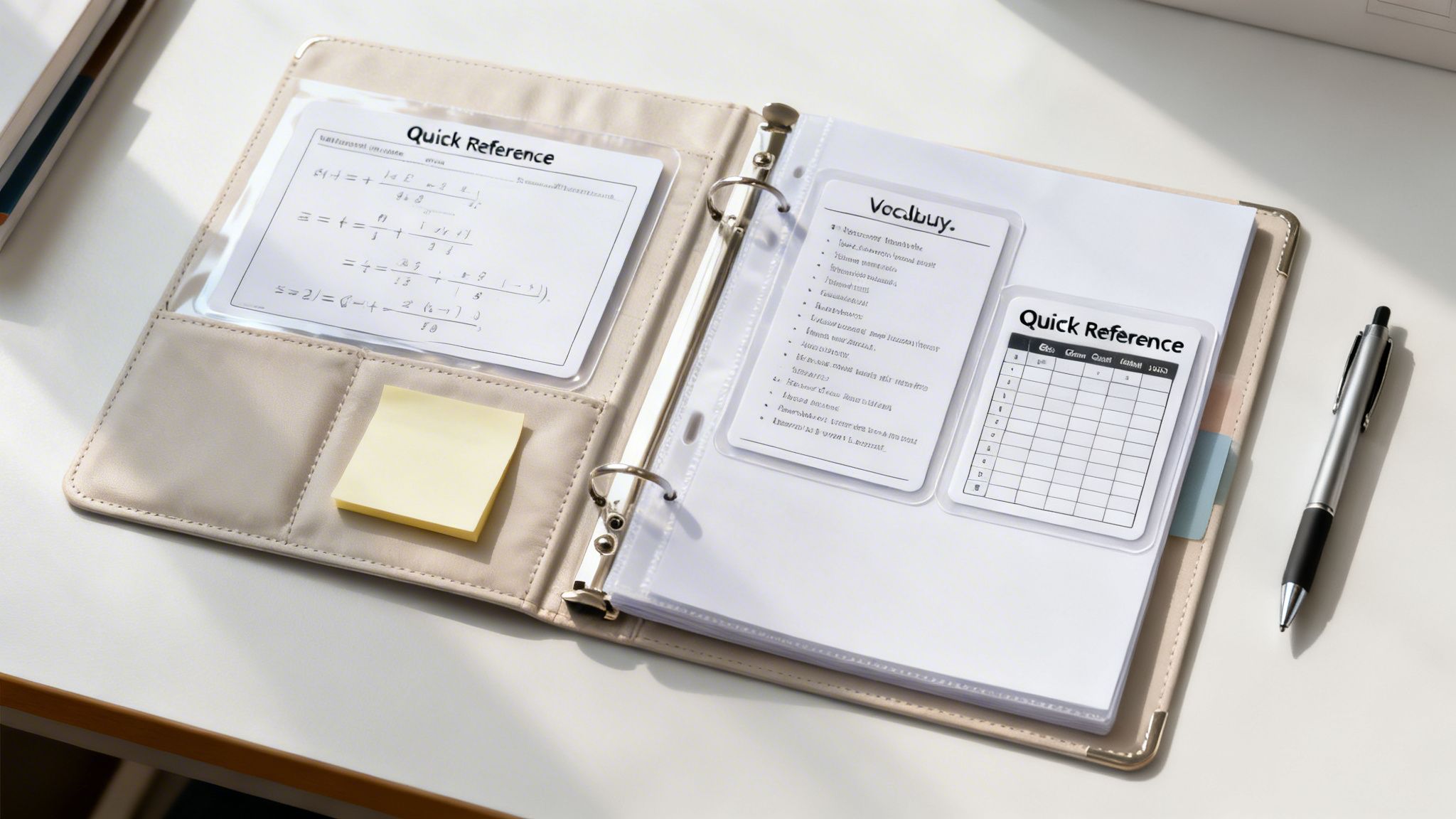
Think of it as the student’s personal cheat sheet, always one flip away. A math student might have a laminated order-of-operations checklist, while a student in an English class could have a writing process guide and a list of common transition words. This school binder organization idea is especially powerful for students with executive function challenges or those receiving tutoring, as it provides instant access to key concepts and strategies discussed in their sessions.
A front matter section turns a binder from a simple storage container into an active learning tool, putting essential information directly at a student's fingertips.
At Bright Heart Learning, our tutors often co-create these reference sheets with students. This process of identifying and summarizing key information reinforces learning and gives students ownership over their study aids. By externalizing important facts, the cognitive load is reduced, freeing up mental energy for higher-level problem-solving and critical thinking.
How to Implement a Front Matter Section
Building an effective reference hub requires curating only the most essential information. Follow these steps to create a useful and uncluttered front matter section:
Be Selective: The goal is quick access, not a textbook reprint. Limit the section to genuinely high-frequency information like math formulas, a periodic table, grammar conjugation charts, or writing checklists.
Laminate for Longevity: Protect these crucial documents from spills and tears by laminating them or placing them in heavy-duty sheet protectors. This also allows students to use dry-erase markers for temporary notes or checking off steps.
Involve the Student: Ask your child, "What information do you look up the most?" Creating the reference sheets together is a powerful study activity that improves retention and ensures the final product is genuinely useful.
Design for Clarity: Use clear headings, icons, and ample white space to make the sheets easy to scan. A cluttered reference sheet defeats the purpose of quick access.
Keep a "Mistakes Log": Dedicate one page to a running list of common mistakes. Reviewing this before a test can be one of the most effective forms of targeted study.
5. Interactive Notebook or Cornell Note-Taking System
A well-organized binder is more than just a place to store papers; it should be an active learning tool. Integrating a structured note-taking system, such as Cornell Notes or an Interactive Notebook, transforms the binder from passive storage into a dynamic space for deeper understanding and retention. This approach is one of the most effective school binder organization ideas for turning class content into durable knowledge.
These systems require students to engage directly with the material. The Cornell Note-Taking System divides a page into distinct sections for main notes, cues or questions, and a summary. This format forces students to process information during and after class. Similarly, interactive notebooks use foldables, reflections, and self-assessment activities to make learning a hands-on process. For students who receive personalized tutoring, these organized notes become an invaluable resource for review and clarification.
A structured note-taking system turns passive listening into active learning, making study time more efficient and effective.
Beyond just storing notes, mastering focused note-taking techniques can significantly boost a student's retention and productivity within their organized binder. This active approach is especially beneficial for complex subjects, like AP courses, or for students with dyslexia who thrive on structured, multi-sensory learning. We guide students in using these methods to build both content mastery and confidence.
How to Implement a Structured Note-Taking System
Successfully adopting these methods requires explicit instruction and consistent practice. Follow these steps to integrate them into your student's binder:
Teach the Format Explicitly: Don't assume students will understand how to use Cornell notes or an interactive notebook. Dedicate time to model the process with real class content, explaining the purpose of each section.
Start with One Subject: To avoid overwhelm, have your student master the system in one subject first. Science is often a great candidate for interactive notebooks, while Math or History works well for Cornell notes.
Provide Clear Prompts: Guide the learning process by including prompts directly on notebook pages or templates, such as "Write one question about this concept" or "Summarize today's lesson in two sentences."
Build in Review Time: The power of these systems lies in reviewing the notes. Encourage students to spend 5-10 minutes after class or during homework time filling out the question and summary sections of their Cornell notes.
Use Visual Cues: Encourage the use of different colored pens or highlighters to categorize information, define key terms, or connect related ideas. This makes the notes easier to scan during study sessions.
6. Progress Tracking and Goal-Setting Documentation
Beyond organizing daily work, a binder can become a powerful tool for building motivation by documenting a student's academic journey. A dedicated section for progress tracking and goal-setting transforms a simple binder into a dynamic record of achievement. This approach involves creating space for learning goals, skill checklists, and visual data that show tangible growth over time.
This method is incredibly effective for students who feel stuck or overwhelmed, as it provides concrete evidence of their hard work paying off. A math student can see a graph showing their quiz scores rising, or a student with dyslexia can review before-and-after reading samples to hear their own fluency improve. This visual proof is essential for building confidence and intrinsic motivation, which is a core part of the Bright Heart Learning philosophy.
Progress tracking isn't about judgment; it's about making learning visible and celebrating the small wins that lead to big breakthroughs.
For students receiving academic support, this section is invaluable. It helps them connect their efforts in tutoring sessions to real-world results in the classroom. By documenting growth, from improved homework completion rates to higher practice test scores, students develop a strong sense of agency and ownership over their learning. This is one of the most meaningful school binder organization ideas for fostering a growth mindset.
How to Implement a Progress Tracking Section
Creating a useful and motivating progress section requires a collaborative and positive approach. Follow these steps to set it up for success:
Establish Collaborative Goals: Sit down with your child to set specific, measurable, and achievable goals. Involving them in the process is critical; they should have a say in what success looks like.
Use Simple Visuals: Don't overcomplicate it. Simple bar charts, line graphs, or sticker charts are often the most effective tools. A student can easily shade in a bar to track the number of books read or plot a point for their latest spelling test score.
Focus on Process and Academics: Track both academic milestones (e.g., mastering multiplication tables) and executive function skills (e.g., remembering to write down assignments). This gives a more complete picture of their development.
Review and Celebrate Regularly: Schedule a brief monthly or bi-weekly check-in to review the trackers. Celebrate every bit of progress, no matter how small, and discuss what strategies are working.
Frame Setbacks as Opportunities: If progress stalls, use it as a chance to problem-solve together. Ask questions like, "What felt tricky this week?" or "What new strategy could we try?" This teaches resilience.
Share with the Team: Regularly share these progress visuals with teachers and tutors. This data helps the entire support team align their strategies and reinforces the student’s efforts across all environments.
7. Accessibility Accommodations Integration System
Standard school binder organization ideas often fail students with learning differences because they ignore the underlying neurological needs. The Accessibility Accommodations Integration System directly addresses this gap by building necessary supports right into the binder's structure. This approach moves beyond generic advice to create a personalized framework for students with dyslexia, ADHD, dyscalculia, and other learning challenges.
Instead of forcing a neurodivergent brain to fit a standard system, this method adapts the system to the brain. For a student with dyslexia, this might mean printing all worksheets on pale blue paper with a dyslexia-friendly font. For a student with ADHD, it could involve highly simplified section layouts with minimal text and bold, pictorial icons instead of words. The binder becomes an active tool for learning, not just a container for papers.
An accessible binder isn't just organized; it's engineered to reduce cognitive barriers and give every student an equitable chance at managing their work.
At Bright Heart Learning, our tutors understand that effective organization for a student with learning differences is a form of accommodation. Tailoring a binder to a student’s specific processing needs is a powerful example of what executive function support looks like in practice. By embedding these supports, we help students build independence and confidence, proving that organization is an achievable skill for everyone.
How to Implement an Accessibility Integration System
Creating a truly accessible binder requires a thoughtful, individualized approach. Collaborate with your child and their educational team to design a system that works.
Assess Specific Needs: Start with the student's formal evaluations (like an IEP or 504 plan) and direct observation. Does the student struggle with visual clutter, reading small text, or remembering sequences? Use these insights as your guide.
Involve the Student: Empower your child by letting them co-design their system. Ask what colors, symbols, or layouts feel easiest to use. This ownership is crucial for consistent use.
Use Evidence-Based Formatting: Research supports proven to help with specific challenges. For dyslexia, consider fonts like OpenDyslexic and high-contrast color schemes. For ADHD, focus on decluttered, single-task-oriented pages.
Build in Multi-Sensory Elements: Go beyond the visual. Use tactile braille labels for blind or low-vision students. Add textured tabs or dividers so students can find sections by feel.
Provide Digital Backups: For students who struggle with paper management, create a parallel digital system using apps like Google Drive or OneNote. A quick photo can save a lost worksheet.
Collaborate and Adjust: Work closely with special educators, tutors, and teachers to implement the system. Schedule regular check-ins to review what’s working and what needs to be adjusted as the student’s needs evolve.
8. Digital Integration and Hybrid Organization System
In an age of online classrooms and digital assignments, one of the most effective school binder organization ideas is a hybrid system. This approach bridges a physical binder with digital tools like Google Drive, OneNote, or Notion. The binder acts as a tangible, focused home base for daily work, while digital platforms provide powerful backup, searchability, and accessibility from any device.
This blended method is perfect for students who split their time between in-person and remote learning. It acknowledges their reality: some resources are on paper, while others are online. For example, a student might take digital notes in OneNote during a lecture but print a weekly summary to keep in their binder for quick, screen-free review. This gives them the focus of physical materials and the convenience of a digital archive.
A hybrid system isn't about choosing between physical and digital; it's about creating a unified command center that works across both worlds.
At Bright Heart Learning, our tutors often work with students to create these synchronized systems. A shared Google Drive folder for homework and progress reports allows for seamless collaboration, while the student’s physical binder remains their personal tool for daily management. This method supports the development of critical executive functioning skills for students by teaching them to manage resources across different formats.
How to Implement a Hybrid Organization System
Building a bridge between physical and digital tools requires a clear plan. Use these steps to create a system that lasts:
Establish Clear Protocols: Decide what lives where. For example, the binder holds the current unit’s worksheets and notes, while the digital folder stores all past units, research articles, and large project files.
Use Consistent Naming Conventions: If a binder tab is labeled “Unit 3: The American Revolution,” the corresponding Google Drive folder should have the exact same name. This mirror-image structure makes finding information intuitive.
Master Scanning Apps: Teach your child to use free apps like Adobe Scan or Microsoft Lens. They can quickly digitize graded papers, signed forms, or annotated worksheets, sending them directly to the correct digital folder.
Schedule a Weekly Sync: Set aside 15 minutes each Sunday to align both systems. This involves filing new physical papers, scanning important documents, and archiving completed digital files.
Start Simple: Begin with one core digital tool, like Google Drive. Avoid overwhelming your student with multiple new apps at once. Once they are comfortable, you can explore others like Notion for more complex project management.
8-Point School Binder Organization Comparison
| System | Implementation 🔄 | Resources & Setup ⚡ | Expected outcomes 📊⭐ | Ideal use cases 💡 | Key advantages |
|---|---|---|---|---|---|
| Subject-Based Color-Coding System | Low — quick to set up; minimal training | Colored dividers, labels, notebooks; small initial cost | Faster retrieval; reduced anxiety; supports organization ⭐⭐ | Visual learners; students with executive-function needs; K–12 | Fast visual ID; easy maintenance; increases ownership |
| Chronological Assignment Tracker with Due Dates | Medium — requires daily/weekly routine 🔄 | Planner pages or printable trackers; regular check-ins | Fewer missed deadlines; improved time management ⭐⭐⭐ | Students who miss deadlines; those building time-management skills | Centralizes deadlines; teaches prioritization |
| Subject-Specific Section Dividers with Content Organization | High — detailed initial setup and labeling 🔄 | Multiple dividers, pockets, labeling supplies; ongoing upkeep | Efficient test review; clearer content types; targeted tutoring support ⭐⭐⭐ | Complex subjects (AP/IB); high-schoolers; students with varied materials | Granular organization; rapid tutor access to specific work |
| Front Matter Reference Section with Quick-Access Resources | Low–Medium — selective curation needed 🔄 | Laminated reference sheets, concise templates; occasional updates | Reduced cognitive load; quick review before assessments ⭐⭐ | Students with working-memory challenges; exam prep | Durable quick-reference; supports independent problem-solving |
| Interactive Notebook / Cornell Note-Taking System | Medium — requires training and modeling 🔄 | Note templates, guided prompts, time for reflection | Better retention and metacognition; built-in study guide ⭐⭐⭐ | Note-heavy courses; students learning study skills; tutoring integration | Active learning; organizes review materials effectively |
| Progress Tracking and Goal-Setting Documentation | Medium — setup of measurable goals and trackers 🔄 | Tracking sheets, charts/graphs, periodic reflections | Visible growth, increased motivation, data-driven tutoring ⭐⭐⭐ | Tutoring programs; skill development; long-term improvement monitoring | Demonstrates progress; guides instruction and accountability |
| Accessibility Accommodations Integration System | High — specialized tailoring and expertise required 🔄 | Special fonts/formatting, high-contrast materials, possible specialist input | Greater access and reduced frustration; equitable learning outcomes ⭐⭐⭐ | Students with dyslexia, ADHD, dyscalculia, or sensory needs | Removes barriers; integrates accommodations seamlessly |
| Digital Integration and Hybrid Organization System | High — tool integration and ongoing sync 🔄 | Cloud tools, scanning apps, devices, training; privacy practices | Backup and searchability; collaboration with tutors/parents ⭐⭐⭐ | Hybrid/remote learners; tech-enabled tutoring; long-term archiving | Combines physical focus with digital accessibility and sharing |
Building Your Action Plan: Making Organization a Sustainable Habit
We've walked through eight distinct school binder organization ideas, from the foundational Subject-Based Color-Coding System to the forward-thinking Digital Integration method. Each strategy presents a structured approach to transforming a student's binder from a source of daily stress into a powerful tool for academic success. The journey from a disorganized backpack to a well-oiled system isn't about finding a single "perfect" solution; it's about building a personalized framework that aligns with your student's specific learning style, challenges, and daily workflow.
A quick review of the core strategies highlights the different pain points each one solves:
Color-Coding & Section Dividers: These are your first line of defense against the "black hole" binder where papers disappear. They create a visual and physical structure that makes filing and finding documents almost automatic.
Chronological Trackers & Front Matter: These systems tackle the executive function challenges of time management and working memory. By placing due dates and essential information front-and-center, they reduce the mental load required to stay on top of assignments.
Interactive Notebooks & Progress Trackers: These methods turn the binder into an active learning tool. They encourage engagement, reflection, and a sense of ownership over the learning process, moving beyond simple paper storage.
Accessibility & Digital Integration: These advanced systems show how a binder can be adapted to support specific learning needs and bridge the gap between physical and digital classroom materials.
From Ideas to Implementation: Your Next Steps
The most effective organizational system is one that a student will consistently use. The key is to avoid overwhelming your child by trying to implement all eight ideas at once. Instead, adopt a "start small, build momentum" approach.
Identify the Biggest Pain Point: Sit down with your student and have an open, non-judgmental conversation. Is the primary issue losing homework? Is it not knowing what's due? Is the binder simply too messy to find anything? Pinpoint the one or two most significant challenges.
Choose Your Starting Strategy: Based on that conversation, select the corresponding strategy from the article. If missing deadlines is the problem, begin with the Chronological Assignment Tracker. If a chaotic mix of papers is the culprit, start with Subject-Based Color-Coding and Section Dividers.
Co-Create the System: Do not impose a system on your student. Work together to choose the colors, label the tabs, and design the checklists. This collaboration fosters buy-in and gives them a sense of control over their own academic life.
Schedule Regular Maintenance: A binder system is not a "set it and forget it" solution. Set aside 10-15 minutes every Sunday evening for a "binder refresh." This is the time to file loose papers, update trackers, and prepare for the week ahead. Making this a routine is critical for long-term success.
Key Insight: Building an organizational habit is a skill, much like learning to solve a math problem or write a persuasive essay. It requires direct instruction, consistent practice, and ongoing support. The goal is not instant perfection but gradual, sustainable progress.
Mastering these school binder organization ideas provides benefits that extend far beyond earning better grades. It teaches critical executive function skills like planning, prioritization, and time management. It reduces anxiety, builds confidence, and empowers students to take ownership of their education. When a student feels in control of their materials, they feel more in control of their learning, which is a foundation for success in college and beyond. For families in the Poulsbo area, our team is available for in-person consultations at our center, conveniently located at 1759 NW Kekamek Drive, Poulsbo WA 98370.
At Bright Heart Learning, we understand that organization is not just about clean binders; it's about building a confident, independent learner. Our executive function coaches work one-on-one with students to design and implement the exact systems they need to thrive, connecting organizational skills directly to their academic and personal goals. If you're ready to move from ideas to action and give your student the gift of organization, explore our personalized tutoring and coaching programs at Bright Heart Learning.